
What is an ERC20 token?
An ERC20 token is a fungible token standard on Ethereum-compatible chains — a smart contract that defines a name, symbol, total supply, and a shared set of functions (transfer, balanceOf, approve, allowance) that every wallet and exchange already knows how to read. Because the interface is standardized, an ERC20 token you deploy today will work in MetaMask, Coinbase Wallet, and any DEX without custom integration work. It's the same standard behind most community tokens, governance tokens, and reward-point systems you'll find onchain.
Why launch on Base?
Base is Coinbase's Ethereum Layer 2, built on the OP Stack. The appeal for a new token launch is straightforward: transaction costs are a small fraction of Ethereum mainnet, confirmation times are fast, and the network settles back to Ethereum for security. It also has an active DeFi and consumer-app ecosystem, so a token deployed there has a real path to wallets, DEXs, and onchain apps rather than sitting isolated on a chain nobody uses. That combination is why so many teams choose to launch a token on Base instead of mainnet Ethereum, especially for community or early-stage projects where gas costs matter.
What you need before starting
Before you start, you need three things: a browser wallet such as MetaMask or Coinbase Wallet, a small amount of ETH on Base to cover gas (a few dollars' worth is typically enough), and a decision on your token's name, symbol, and total supply. You don't need an IDE, a compiler, or any prior Solidity experience — that's the point of a no-code ERC20 creator. QryptoLauncher's factory contract has already been written, audited in its logic, and deployed; your job is just to configure the parameters and sign the transaction.
The QryptoLauncher step-by-step process
The QryptoLauncher process is intentionally short. Connect your wallet from the top of the app and confirm you're on Base Mainnet (or Base Sepolia if you want to do a free test run first). Open the ERC20 creation flow, which acts as a Base token generator — a form sitting in front of a standardized, OpenZeppelin-based contract. Fill in your token details, review the fee breakdown, and confirm the transaction in your wallet. That's the entire flow to deploy an ERC20 smart contract: no code editor, no deployment script, no private key ever leaves your wallet.
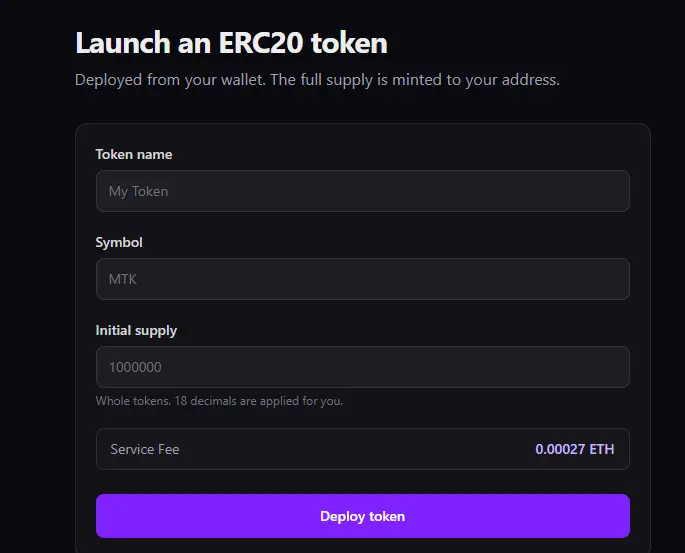
Token name, symbol, supply, and decimals
Four fields matter most: name (the full, human-readable name your token will show in wallets and explorers), symbol (the short ticker, usually 3–5 characters, shown next to balances), total supply (how many tokens exist at deployment — QryptoLauncher mints the full supply to your wallet in one transaction), and decimals. Decimals control how divisible your token is; QryptoLauncher uses the standard 18 decimals used by ETH and most ERC20 tokens unless you're deliberately matching a different standard. Name and symbol are permanent once deployed, so it's worth typing them twice before confirming.
Gas fee vs. QryptoLauncher service fee
Every deployment involves two separate costs, and it helps to know which is which. The gas fee is paid to the Base network itself, not to QryptoLauncher — it covers the computation of deploying and initializing your contract, and it fluctuates with network activity. QryptoLauncher's service fee is a separate, transparent charge shown before you confirm, covering the factory infrastructure, frontend, and ongoing maintenance. Your wallet will show both as part of the total transaction cost, and nothing is charged silently — you approve the exact amount before signing.
How to inspect your contract on BaseScan
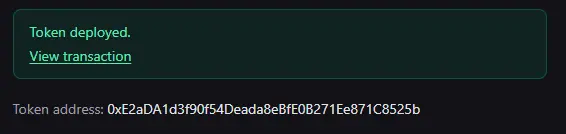
Once your transaction confirms, your token has a real contract address on Base, and you can verify everything yourself on BaseScan. Search your wallet address or the transaction hash, open the new contract, and check the Contract tab to confirm the source is verified against OpenZeppelin's ERC20 implementation. The Holders tab will show your wallet holding 100% of the initial supply, and the Read Contract tab lets you query name, symbol, decimals, and totalSupply directly against the chain — no dashboard required. This is the same public record anyone else can check, which is exactly the point of deploying onchain instead of trusting a private database.
Risks and responsibilities
Here's the part worth being blunt about: creating a token does not automatically create liquidity, value, utility, buyers, or regulatory compliance. QryptoLauncher deploys a real, functioning ERC20 contract — it does not create a market for it, list it on an exchange, guarantee anyone will want to hold it, or determine whether your specific token and jurisdiction require securities, tax, or other regulatory compliance. Adding liquidity to a DEX, marketing the token, and understanding the legal obligations in your jurisdiction are entirely separate steps that are your responsibility, not the platform's. Treat the deployment as the beginning of the work, not the end of it.
It's also worth remembering that blockchain transactions are irreversible. Once your contract is deployed, you cannot edit its name, symbol, or the initial supply logic — you can only deploy a new one. Double-check your inputs, keep your seed phrase offline and never share it, and consider running through the entire flow on Base Sepolia testnet first so a typo doesn't cost you real gas.
Frequently asked questions
Do I need to know Solidity to create an ERC20 token on Base? No. QryptoLauncher's no-code ERC20 creator handles the contract code; you only fill in the token parameters and sign the transaction in your wallet.
Who owns the token supply after deployment? You do. 100% of the initial supply is minted directly to the wallet you deployed from — QryptoLauncher never holds or custodies your tokens.
Can I change the name or symbol after deploying? No. Those values are fixed in the contract at deployment. If you need different values, you'll need to deploy a new token.
Does launching a token on Base mean it will be listed on an exchange? No. Deployment only creates the contract. Getting listed on a DEX or CEX, adding liquidity, and building demand are separate steps you handle afterward.
Is QryptoLauncher custodial? No. QryptoLauncher is non-custodial — your wallet signs every transaction, and the app never has access to your private keys or funds.
Ready to launch?
If you're ready to deploy an ERC20 smart contract on Base, the process takes a wallet, a few minutes, and a small amount of ETH for gas. Head to QryptoLauncher, connect your wallet, and launch your token on Base — just go in knowing that the contract is only step one, and everything that gives a token real utility happens after it's live.